
Manila, Philippines (April 6, 2026) — As higher education adjusts to the changing demands of work, students and educators require tools that can keep up with today’s increasingly complex academic landscape. To demonstrate how modern devices are transforming learning, HUAWEI Philippines has partnered with the University of Asia and the Pacific (UA&P) – School of Economics to showcase the HUAWEI MatePad 11.5 S 2026 in action. Positioned as a powerful, all-in-one solution, it seamlessly combines PC-level productivity, paper-like writing comfort, and creative flexibility.
Designed as a 4-in-1 Better-Than-Ever Productivity Tablet, the HUAWEI MatePad 11.5 S 2026 reflects how technology can elevate not just efficiency, but the overall learning experience across disciplines from economics and data science to media, business, and the humanities.
Transition from Tablet to Laptop with the 4-in-1 PC-Like Bundle Powered by NearLink
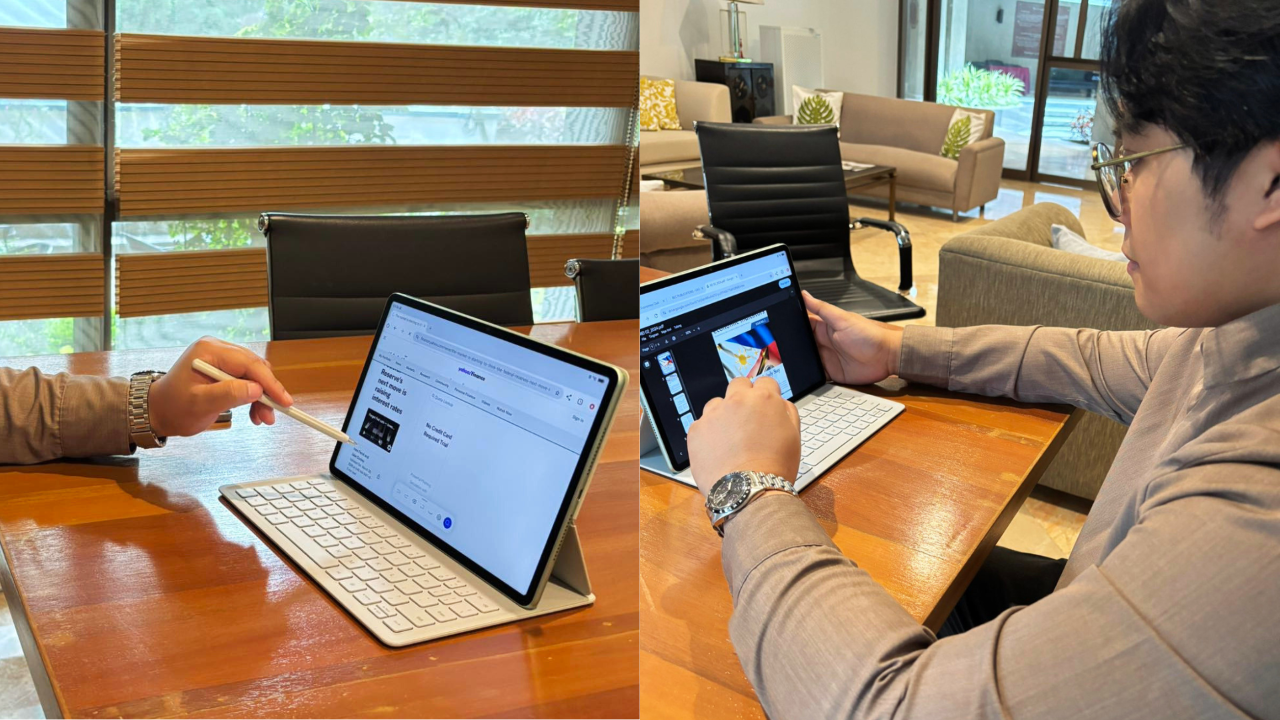
Adapting to the fast-paced nature of university life, the device easily transitions from a portable tablet to a full desktop setup. At the core of this experience is a versatile hardware ecosystem comprising the HUAWEI MatePad 11.5 S 2026, the HUAWEI Smart Magnetic Keyboard, the HUAWEI M-Pencil (3rd Gen), and a Bluetooth mouse.
Powered by NearLink connectivity, the accessories deliver zero-lag navigation. The M-Pencil offers 10,000+ levels of pressure sensing and ultra-low latency for fluid writing, while the keyboard features 1.5 mm of key travel for comfortable typing. With multiple modes, including Laptop, Split, and Studio, students can easily switch between writing papers, annotating readings, or presenting ideas.
This versatile 4-in-1 setup empowers users to effortlessly navigate the four pillars of campus life. It tackles PC-level workloads with desktop-grade precision for work, serves as a focused study tool for coursework and note-taking, and unlocks professional-grade drawing and editing tools for creatives. When it’s time to unwind, the tablet seamlessly transitions into a premium entertainment hub for streaming and gaming.
“The seamless transition between laptop and split modes is a game-changer for teaching. I can type up a syllabus and then instantly detach the keyboard to walk around and annotate slides live during a lecture,” says Marco Agonia, Faculty Member at UA&P School of Economics.
Students can take split-screen notes during online lectures and instantly switch to drafting reports using keyboard shortcuts. Similarly, educators can seamlessly annotate materials live and manage hybrid classes from a single device.
PC-Level Efficiency for Academic Workflows with WPS Office 3.0
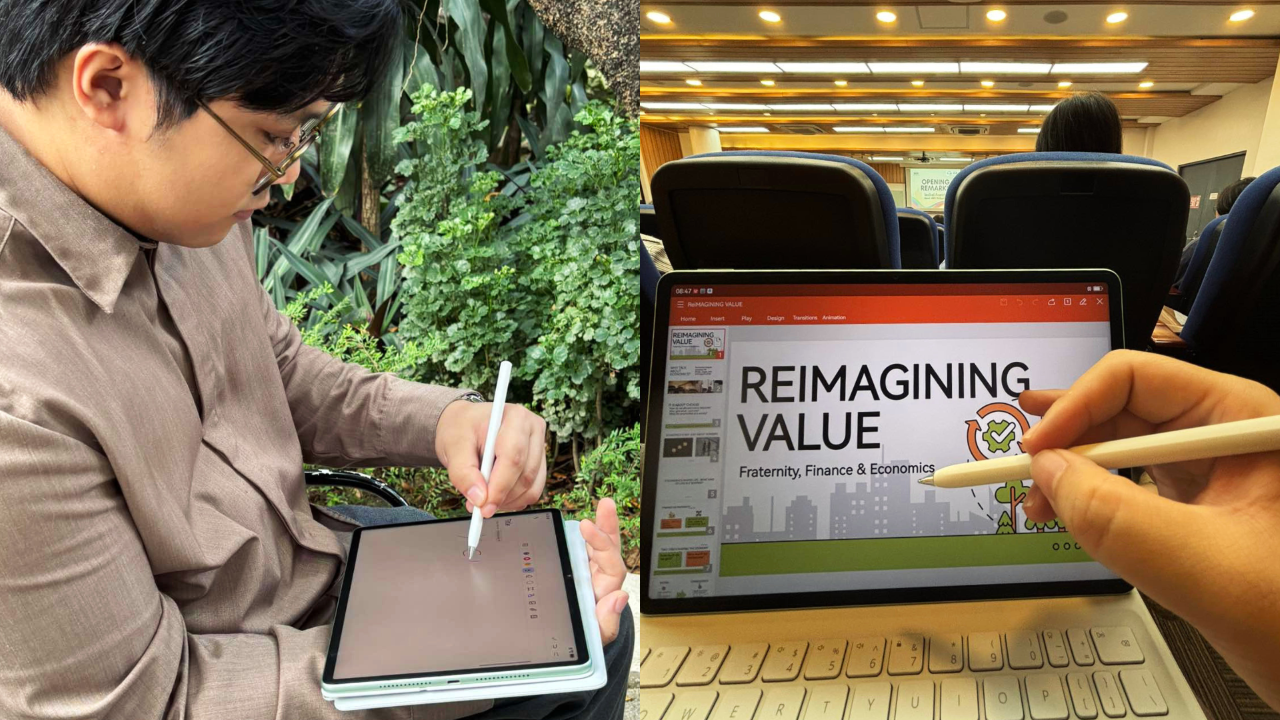
University work often means juggling research papers, presentations, datasets, and collaborative documents all at once. The HUAWEI MatePad 11.5 S 2026 helps students address this with PC-level WPS Office 3.0, which delivers a familiar desktop-style interface that supports full document, spreadsheet, and presentation editing across more than 40 file formats.
With advanced tools like pivot tables, LaTeX equation support, and precision cursor control, students can perform complex academic tasks such as financial modeling, case analysis, or thesis writing directly on the tablet. Paired with support for over 40 shortcut keys, users experience the same level of control and efficiency as they would on a laptop without the added bulk.
For educators, this translates into a more flexible teaching workflow. Professors can seamlessly prepare lecture slides, review submissions, and conduct virtual consultations using platforms like Zoom or Google Meet, all within a single device.
“I didn’t expect to handle full spreadsheets and reports so easily on a tablet—it really feels like working on a laptop, but with much more flexibility,” shares Agonia.
Read and Watch Clear Visuals with the Ultra-clear 3rd Gen PaperMatte Display
Long hours of reading and writing are part of university life, making screen comfort essential. The 11.5-inch 2.8K Ultra-clear 3rd Gen PaperMatte Display on the HUAWEI MatePad 11.5 S 2026 uses high-precision nanoscale anti-glare etching technology with 3A+ glass to reduce sparkle by up to 50%. The display blocks 99% of ambient light interference, delivering a screen experience that feels closer to paper than glass.
With a 144 Hz adaptive refresh rate and 500 nits of peak brightness, students can read dense academic materials, annotate journal articles, or review lecture slides for extended periods without eye strain, even in bright classrooms, libraries, or sunlit cafés. The added paper-like texture also enhances handwriting precision, making note-taking more natural and controlled.
For educators, this means being able to review materials, annotate documents, and deliver content comfortably throughout the day.
“It’s much easier on the eyes compared to other displays. I can review lengthy research papers and grade student submissions for hours without feeling fatigued or struggling with screen glare, even in a bright faculty lounge,” shares Diane Rueda, Faculty Member at UA&P School of Economics.
Turn Complex Concepts into Visuals with Creative Apps in HUAWEI Notes and GoPaint
Beyond productivity, higher education is about developing ideas and communicating them effectively. The HUAWEI MatePad 11.5 S 2026 supports this through its integrated creative ecosystem, powered by HUAWEI Notes and GoPaint. Students can efficiently revisit lectures using Note Replay, solve complex math problems with AI Equation Recognition, and effortlessly polish their handwriting to stay organized.
When it’s time to visualize ideas, GoPaint equips users with over 150 professional brushes and intuitive tools like Intelligent Color Card extraction, empowering both students and educators to easily design engaging infographics, diagrams, and visual presentations that bring complex concepts to life.
“HUAWEI Notes makes it easy to turn scattered thoughts into structured plans. I use the AI Handwriting Enhancement to instantly clean up my messy brainstorming sessions, and it really makes my pitch outlines clearer and more professional,” says Rueda.
Power Through Busy Days with Reliable Performance and Portability
To support these advanced features, the HUAWEI MatePad 11.5 S 2026 is equipped with a 3D custom VC heat dissipation architecture that ensures smooth and stable performance even during intensive multitasking. This allows students to run multiple apps simultaneously. They can attend an online class discussion while reading a research paper without lag or overheating. This makes it ideal for high-pressure academic scenarios like thesis writing or group project deadlines.
The HUAWEI MatePad 11.5 S 2026 remains highly portable with a 6.1 mm ultra-thin metallic body and 515 g weight. It is powered by an 8,800 mAh dual-cell battery with 40W fast charging that provides over 10 hours of power, from classrooms and study halls to cafés and home setups.
“It’s light enough to take everywhere, yet the cooling system and battery life are powerful enough to handle rendering videos and running spreadsheets simultaneously,” shares Rueda.
Exclusive HUAWEI MatePad 11.5 S 2026 Offer for Students
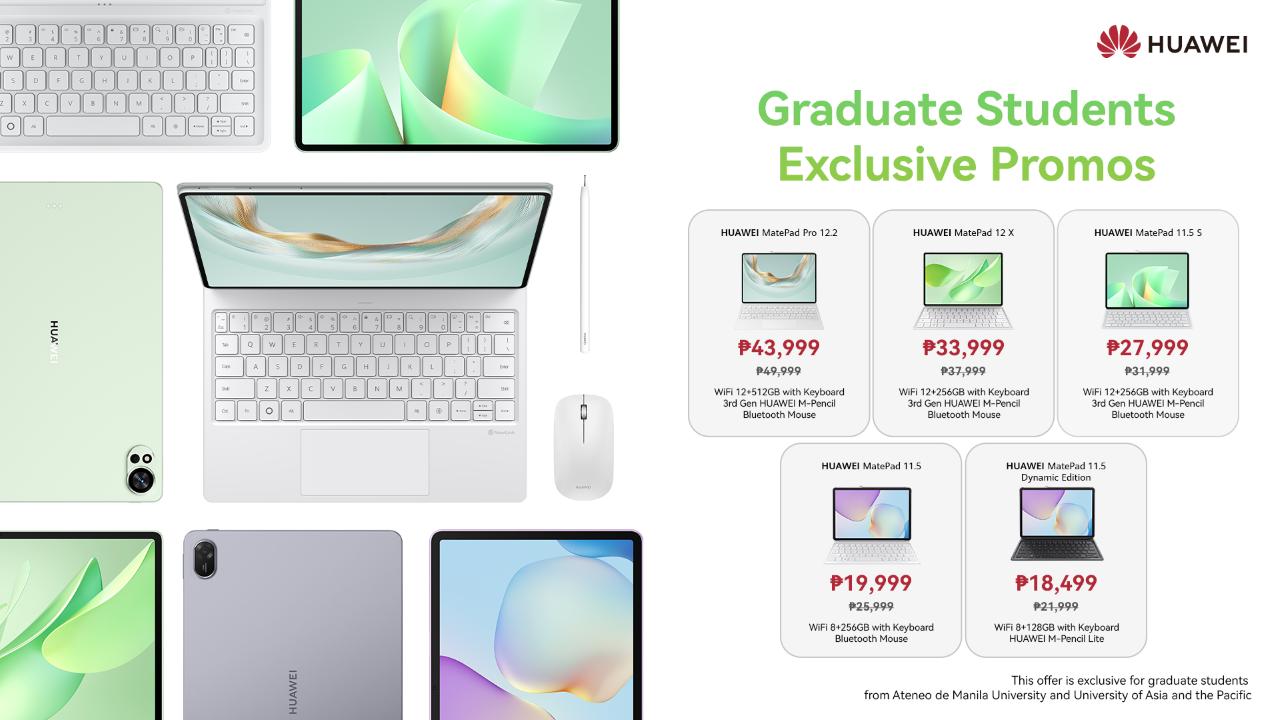
The HUAWEI MatePad 11.5 S 2026 is designed to inspire smarter learning and teaching, enabling higher education institutions to foster vibrant, interactive environments where complex ideas come to life.
To support this vision, HUAWEI is proudly partnering with prestigious universities across the country to empower the next generation of innovators. As part of this exclusive collaboration, from April 1 to 30, 2026, university students from the University of Asia and the Pacific (UA&P) can enjoy exclusive discounts on a range of premium tablets, along with exciting freebies.
How to Claim Your Exclusive Student Price:
- Visit the Store: Go to the official HUAWEI offers page at https://consumer.huawei.com/ph/offer/.
- Log In: Click “Login” in the upper right corner of the page.
- Verify Your Status: Register and log in using your official university email address: @uap.asia.
- Select Your Device: Visit the product page of any of the eligible tablets below to automatically enjoy your exclusive discounted price:
| Model | Specs | SRP (PHP) | Discount Price (PHP) |
| HUAWEI MatePad Pro 12.2 | WiFi 12+512 with HUAWEI Smart Magnetic Keyboard + HUAWEI M-Pencil 3rd Gen + Bluetooth mouse | PHP 49,999 | PHP 43,999 |
| HUAWEI MatePad 12 X | WiFi 12+512 with HUAWEI Smart Magnetic Keyboard + HUAWEI M-Pencil 3rd Gen + Bluetooth mouse | PHP 37,999 | PHP 33,999 |
| HUAWEI MatePad 11.5 S | WiFi 12+512 with HUAWEI Smart Magnetic Keyboard + HUAWEI M-Pencil 3rd Gen + Bluetooth mouse | PHP 31,999 | PHP 27,999 |
| HUAWEI MatePad 11.5 2025 | WiFi 12+512 with HUAWEI Smart Magnetic Keyboard + HUAWEI M-Pencil 3rd Gen + Bluetooth mouse | PHP 25,999 | PHP 22,999 |
| HUAWEI MatePad 11.5 Dynamic | WiFi 12+512 with HUAWEI Smart Magnetic Keyboard + HUAWEI M-Pencil 3rd Gen + Bluetooth mouse | PHP 21,999 | PHP 18,999 |
Visit HUAWEI’s official website or social media accounts (Facebook | Instagram) for more updates.